
There is a temperature at which a phone stops being a warm object in your hand and becomes something you instinctively put down. Most people have felt it — on a video call in the sun, twenty minutes into a game, or halfway through a fast charge — and most people have wondered whether it means something is wrong.
Sometimes it does not. Phones are small computers with no fans, and they get warm doing hard work. That is normal, and the phone has a thermal management system designed to handle it.
Sometimes it does. A phone overheating while idle, or getting hot every time it charges, or warming up in a way that is new, is telling you something specific — and in the majority of those cases, the specific thing is a battery that has started to fail.
And occasionally it is urgent. Two causes on the list below mean stop using the phone today, not next week.
At Fone Doctors heat complaints are one of the most common reasons a battery gets replaced, and one of the least understood. This guide draws the line between normal, worn and dangerous, and tells you what each one costs to fix.
Normal, Warm, or Dangerous?
The single most useful thing you can learn is where the line sits.
| What you feel | Approximate temperature | What it means | Action |
|---|---|---|---|
| Slightly warm — noticeable but comfortable | 35 to 40°C | Normal under load: video calls, navigation, gaming, fast charging | None. This is the phone working |
| Warm — you notice it every time you pick it up | 40 to 43°C | Elevated. Fine briefly under heavy load, not fine at idle | Investigate if it happens during light use |
| Hot — uncomfortable to hold for long | 43 to 48°C | The phone will start thermal throttling: dimming, slowing, pausing charge | Stop what you are doing; let it cool; find the cause |
| Very hot — you want to put it down | Above 48°C | The phone will show a temperature warning and may shut down | Move it out of the sun, off charge, and let it cool completely before use |
| Hot while doing nothing, or hot plus swelling, or any smell | Any | Battery fault or component failure | Stop using and charging it. Get it assessed today |
Both iOS and Android will display a temperature warning and restrict the phone when it gets genuinely hot. That is a protection system, not a fault. What matters is how often you see it and what you were doing when it appeared.
The Eight Causes of Phone Overheating
In rough order of how often we see them.
1. A worn battery with high internal resistance
This is the big one. As a lithium-ion cell ages, its internal resistance rises. Every unit of energy that passes through it — charging in, or powering the phone out — converts a larger share into heat instead of useful work. The phone runs warmer doing the same tasks it did cool a year ago, and it runs noticeably warm while charging.
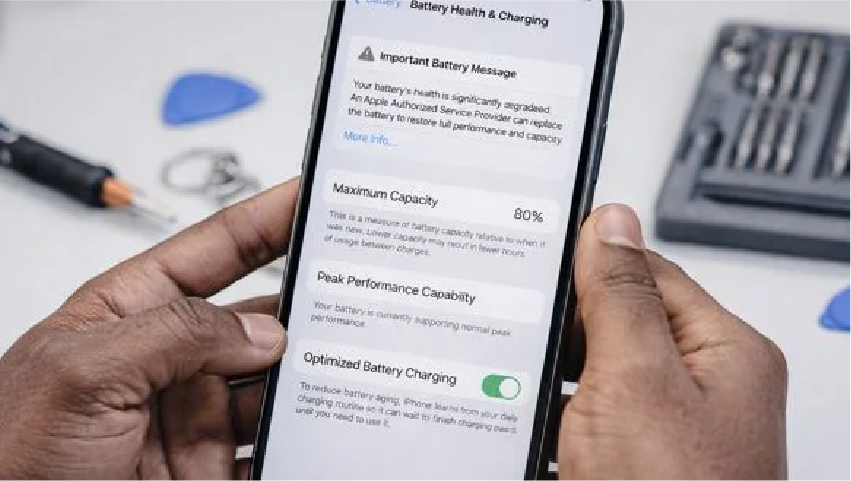
The signature: the phone has become warmer over months, not overnight, and battery health is below about 85 percent. This is the most common cause of "why is my phone hot" and the most straightforward to fix.
2. Charging — especially fast charging with a case on
Charging generates heat by nature; fast charging generates more. Add a thick case that traps it, a soft surface like a bed that blocks airflow, and a phone that is also being used, and you have a phone running at 43°C or more for an hour. Most modern phones will slow the charge when hot, which is why a charge that "used to be faster" often just means the phone is being sensible.
3. Direct sunlight and ambient heat
A phone on a car dashboard, a windowsill or a café table in July can reach 50°C from the sun alone before it has done any work. Black phones and phones in dark cases absorb more. This is the most common cause of the temperature warning screen, and it is entirely environmental.
4. Demanding apps and background activity
Gaming, video calls, 4K recording, augmented reality and navigation with the screen on are the heaviest loads a phone runs. So is a misbehaving app stuck in a loop, a location service polling constantly, or a photo library re-indexing after a software update. A phone that is hot with the screen off and nothing obviously running has something working hard in the background.
5. Poor signal
A phone in a weak signal area increases its radio power to stay connected, sometimes dramatically. Long journeys through areas of patchy coverage — the Underground, rural train lines, thick-walled buildings — can leave a phone warm for no visible reason.
6. A damaged or non-compliant charger
Cheap chargers and cables deliver unstable voltage that forces the phone's charging circuitry to work harder and run hotter. A frayed cable does the same. If the phone is only hot with one particular charger, the charger is the problem.
7. A failed charging circuit
When the charging integrated circuit on the logic board fails, a classic symptom is a phone that gets hot while charging but gains little or no charge. The energy is going in and being converted to heat at the board rather than stored in the cell. This is a board-level fault and needs diagnosing.
8. Water damage
Corrosion on the logic board creates unintended electrical paths. Some of those leak current continuously, generating heat and draining the battery. A phone that started running warm after a spill — even one that seemed harmless weeks ago — should be assessed for corrosion.
The Two Causes That Mean Stop Now
Everything above is manageable. These two are not.
A swollen battery. If the screen is lifting from the frame, the back is bulging, the phone rocks on a flat table, or the case suddenly does not fit, the battery has swollen. A swollen cell is generating gas internally, is under pressure, and is a genuine fire risk. It also puts mechanical stress on the screen and the logic board. Stop charging it, do not press on it, do not put it in a pocket or bag, and bring it in today.
Heat with no load, plus any smell. A phone that is hot while doing nothing, particularly with a sweet, solvent-like or burning smell, has a component failing. Power it off, unplug it, and get it assessed.
In either case, bring it straight to our London clinics. Swollen battery replacement is a routine repair when handled properly and a hazard when it is not — it is not a job for a kitchen table.
When Overheating Means the Battery
Here is how to tell whether your heat problem is the battery specifically.
| Check | Points to the battery if... |
|---|---|
| Battery health reading | Below 85 percent (Settings, Battery, Battery Health on iPhone; Battery and Device Care, Diagnostics on Samsung) |
| When it gets hot | Every time it charges, and during ordinary use — not just under heavy load |
| How it developed | Gradually over months, alongside shorter battery life |
| Other symptoms | Sudden shutdowns above 20 percent, rapid percentage drops, slower performance |
| Age | More than two years, or more than 500 charge cycles, with the original battery |
| Physical | Any swelling, however slight |
Three or more of those together make it a near-certainty. Our battery replacement service starts from £49, takes 30 to 45 minutes, and includes a load test that measures internal resistance directly — so we can confirm the battery was the cause rather than guessing. A healthy cell with low resistance runs cooler under every condition, and the difference is usually obvious the first time you charge it.
Fixes You Can Try Today
For the causes that are not the battery.
| Cause | Fix |
|---|---|
| Charging heat | Take the case off while charging. Charge on a hard surface. Do not use the phone heavily while fast charging. Use a slower charger overnight |
| Sun and ambient heat | Move it into shade. Never leave it on a dashboard. Let it cool completely before use — a hot phone charged is a phone aged faster |
| Demanding apps | Close the app. Check Settings for battery usage by app to find what is running hot. Turn off background app refresh for apps that do not need it |
| Background activity after an update | Leave the phone plugged in overnight with Wi-Fi on. Re-indexing completes and the heat stops |
| Poor signal | Enable Wi-Fi calling. Use airplane mode on the Underground. Nothing else can be done about the network itself |
| Bad charger or cable | Replace with a quality certified one. If the heat stops, that was the cause |
| Software bug | Update the operating system. Restart the phone. If a specific app is the culprit, reinstall it |
If none of those applies, or the heat persists after trying them, the fault is in the phone and it needs a diagnostic.
Why Heat Matters Even When It Is "Normal"
Heat is the single biggest factor in battery degradation — more than charge cycles, more than fast charging, more than anything else. A battery kept at 35°C ages roughly twice as fast as one at 25°C.
That creates a vicious cycle. A worn battery runs hot. Running hot wears the battery faster. Which makes it run hotter. A phone that has been "a bit warm" for six months has often lost more capacity in that period than in the previous year.
It also affects everything else. Heat degrades the adhesive holding the screen, the waterproofing seals, the display's OLED panel, and the solder joints on the board. Keeping a phone cool is the cheapest maintenance there is.
Related repair guides
See also phone battery health and a phone that will not turn on.
Key Takeaways
- Warm under heavy load, fast charging or sun is normal. Hot at idle, on every charge, or hot plus swelling is not.
- A worn battery with high internal resistance is the most common cause of a phone that has become warmer over months. Replacement from £49 fixes it.
- Take the case off to charge, charge on a hard surface, and keep it out of the sun. These three habits prevent most heat complaints.
- A swollen battery is a fire risk. Stop charging, do not press it, bring it in today.
- Heat while charging without gaining charge points to the charging circuit, not the battery.
- Heat is the biggest cause of battery ageing. Keeping a phone cool is the cheapest maintenance there is.
Free Battery and Thermal Check
Load test that measures battery resistance directly, honest advice on whether it is the battery, the charger or the environment, and replacement from £49 while you wait. Walk into our London Bridge, Liverpool Street or Canary Wharf clinics, or book a collection.
Book a diagnostic: https://fonedoctors.co.uk/booking/device
See all repair prices: https://fonedoctors.co.uk/prices
Call the clinic: +44 20 7403 9111
Frequently asked questions
Most commonly because of a worn battery with high internal resistance, which converts more energy into heat than it used to. Other frequent causes are fast charging in a case, direct sun, demanding apps, poor signal and a non-compliant charger. Heat while the phone is idle, or heat combined with swelling, points to a fault that needs immediate attention.
Share with your community
Get in touch
Questions about this repair? Send a message or book a slot at a London clinic.