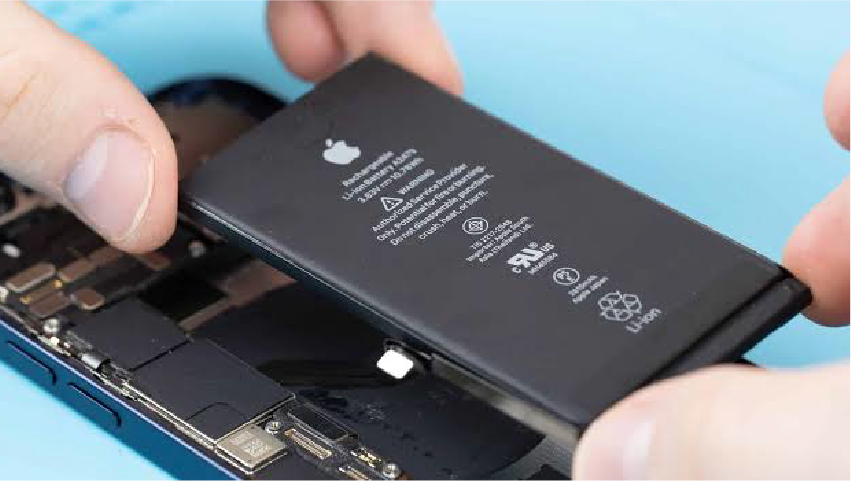
There is a particular stage in an iPhone's life where it stops being a phone and starts being a negotiation. You ration the camera. You decline video calls. You develop an instinct for which cafés have plugs near the tables. You start carrying a cable everywhere, then a power bank, then a bigger power bank.
Almost everyone in that position assumes the phone is finished. It usually is not. An iPhone battery replacement in London costs between £39 and £119, takes about half an hour, and in most cases returns the device to genuinely all-day runtime and full processor speed.
That last part surprises people. When iOS detects a worn battery it deliberately limits peak performance to stop the phone shutting down unexpectedly. So the phone that feels slow, warm and short-lived is frequently one component away from behaving like it did two years ago. At Fone Doctors we see this every day, and the free diagnostic that establishes it takes ten minutes.
The Seven Signs You Need a New iPhone Battery
You do not need all seven. Two or three together is a clear answer.
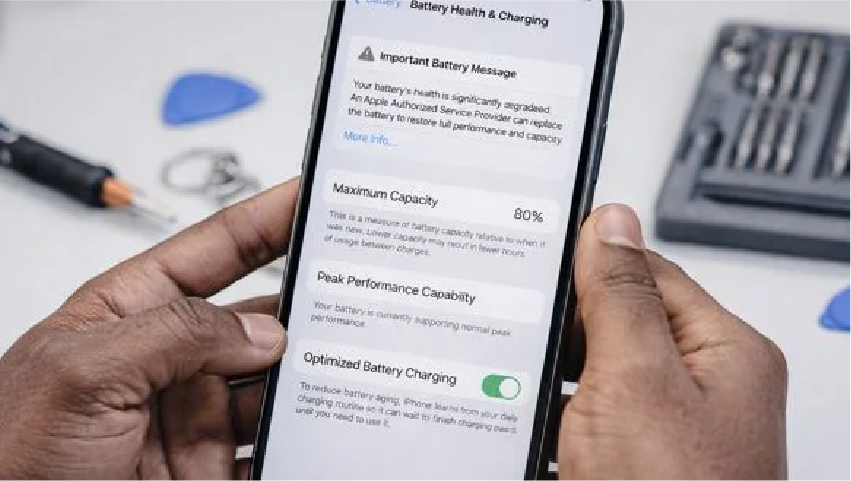
1. Maximum Capacity below 80 percent
Settings, then Battery, then Battery Health and Charging. This is Apple's own service threshold and the most objective single indicator.
2. Unexpected shutdowns above 20 percent
The classic symptom. A worn cell cannot hold voltage under load, so the phone cuts out to protect itself. If your phone has died at 30 percent in cold weather, this is why.
3. A "Peak Performance Capability" message
If Battery Health displays a message about performance management having been applied, iOS has already throttled your processor. The phone is not old. It is being nursed.
4. Rapid percentage drops
Losing 15 or 20 percent in a few minutes of ordinary use, or watching the figure jump backwards, points to a degraded cell and an inaccurate charge gauge.
5. It charges to 100 percent and dies in four hours
A full charge into a shrunken tank. The percentage is honest about being full; it just is not much any more.
6. The phone runs hot when idle
Worn cells have higher internal resistance, which converts more energy into heat rather than useful power.
7. Any bulging, or a screen lifting from the frame
This is a swollen battery. Stop using the phone. It is a fire risk and needs replacing today, not next month.
| Symptom | Almost certainly the battery | Might be something else |
|---|---|---|
| Maximum Capacity below 80% | Yes | No |
| Shutdowns above 20% charge | Yes | Rarely, a power management fault |
| Performance management message | Yes | No |
| Charges very slowly | Sometimes | Often the charging port or cable |
| Will not charge at all | Rarely | Usually the charging port |
| Drains fast but health is above 90% | No | Software, a rogue app, or background location |
| Screen lifting from the frame | Yes, urgently | No |
That last group matters. If battery health reads above 90 percent and the phone still drains quickly, the fault is very likely software — a misbehaving app, aggressive background refresh, or a location service running constantly. Replacing the battery will not fix that, and we will tell you so rather than take your money.
iPhone Battery Replacement Prices in London (2026)
All figures below are all-inclusive: cell, labour, calibration, testing, waterproofing gasket where applicable, and VAT. Diagnostics are free whether or not you proceed.
| iPhone model | Typical turnaround | From |
|---|---|---|
| iPhone 17 Pro Max / 17 Pro | 45 minutes | £119 |
| iPhone 16 Pro Max / 16 Pro | 45 minutes | £99 |
| iPhone 16 / 16 Plus | 40 minutes | £89 |
| iPhone 15 Pro Max / 15 Pro | 40 minutes | £89 |
| iPhone 15 / 15 Plus | 40 minutes | £79 |
| iPhone 14 series | 35 minutes | £69 |
| iPhone 13 series | 35 minutes | £59 |
| iPhone 12 series | 35 minutes | £55 |
| iPhone 11 / XR / XS / X | 30 minutes | £49 |
| iPhone SE 2nd and 3rd generation | 30 minutes | £39 |
Prices are indicative starting points for 2026 and confirmed as a fixed figure after the free diagnostic, before any work begins.
Why newer models cost more
Three reasons, all structural. Newer iPhones use larger, higher-density cells that cost more to source. They are bonded with stronger stretch-release adhesive under tighter clearances, which takes longer to remove safely. And from the iPhone XS onward, batteries carry authentication data that must be paired to the logic board, otherwise iOS displays a service warning and hides battery health readings entirely.
That pairing step is the one most commonly skipped by budget repairers. It is why some customers end up with a brand-new battery and a permanent warning message.
Apple, DIY Kit, or Independent Repair?
There are three realistic routes, and the right one genuinely depends on your circumstances.
| Factor | Apple Store | DIY kit | Independent specialist |
|---|---|---|---|
| Typical cost | £69 to £115 plus travel | £25 to £45 for the kit | £39 to £119 all-inclusive |
| Time to completion | Appointment often days ahead, device may be kept | 2 to 4 hours of your own time, first attempt | 30 to 45 minutes, walk-in |
| Battery health pairing | Yes | No, warning message persists | Yes, when done properly |
| Risk of collateral damage | Very low | Significant — screen flex cables and Face ID are easily damaged | Very low |
| Warranty on the work | Yes | None | 12 months |
| Older models still supported | Often discontinued | Parts available | Yes |
| Waterproof seal restored | Yes | Almost never | Yes, where the model supports it |
Choose Apple if the device is still under AppleCare and you can spare the appointment time.
Avoid the DIY kit unless you have done this before and accept the risk. The battery adhesive strips snap constantly, the display flex cables that run over the battery are startlingly easy to tear, and a punctured lithium cell is a genuine fire in a domestic kitchen. We repair several botched DIY attempts a month, and the repair is always more expensive than the original job would have been.
Choose an independent specialist if you want it done today, want the older model Apple no longer services, or want the same technical standard without the appointment queue.
What The Repair Involves
An iPhone battery replacement is a precise job disguised as a simple one. Here is the actual sequence.
- Free diagnostic. Measured cycle count, actual capacity under load, and voltage sag under stress — not just the Settings readout. This also rules out a charging port fault masquerading as a battery fault.
- Safe power-down and isolation. The display is separated under controlled heat and the battery connector is disconnected before any other component is touched.
- Adhesive release. Stretch-release strips are drawn out slowly at a controlled angle. Where they snap, which is common on older devices, controlled isopropyl release is used rather than force. The cell is never levered or bent.
- Fitting a capacity-matched cell with genuine protection circuitry, matched to the original specification rather than a marketing mAh figure.
- Battery health data pairing so iOS reports accurate capacity and no service warning appears.
- Reseal and test. A fresh waterproofing gasket where the model supports one, then a full charge and load test before the phone goes back to you.
Our iPhone battery replacement in London follows that protocol on every device, carries a twelve-month warranty, and is completed while you wait in most cases.
Where To Get It Done In London
Not everyone can spare a lunch hour in a shop, so there are three routes to the same result.
| Route | Best for | Turnaround |
|---|---|---|
| Walk-in | Anyone near London Bridge, Liverpool Street or Canary Wharf | 30 to 45 minutes while you wait |
| Collect and return | Office workers, anyone who cannot leave their desk | Same day across central London |
| UK-wide postal | Customers outside London | 2 to 3 working days, tracked and insured both ways |
Our three London clinics sit within a few minutes' walk of London Bridge, Liverpool Street and Canary Wharf stations, which covers most City and Docklands commutes without a detour. Same parts, same protocol and same twelve-month warranty regardless of which route you use.
Getting The Most From Your New Battery
A fresh cell resets the clock. These habits decide how long it stays reset.
- Keep it cool. Heat above 35°C is the single largest cause of degradation — worse than charge cycles. No dashboards, no windowsills, no charging under a pillow.
- Leave Optimised Battery Charging on. It holds the charge at 80 percent overnight and completes shortly before your alarm, which meaningfully reduces the time spent at full charge.
- Aim for the 20 to 80 percent band where convenient. You do not need to be religious about it, but avoiding both extremes helps.
- Take the case off while fast charging. Cases trap heat exactly where you least want it.
- Use a decent charger. Unstable voltage from cheap chargers makes the phone's charging circuitry run hotter.
- Do not fully discharge to recalibrate. That advice belongs to a battery chemistry that has not been used in phones for twenty-five years.
Followed reasonably, most replacement batteries hold above 85 percent capacity for two years or more.
Related repair guides
To understand the 80 percent threshold and what the health figure actually means, read phone battery health explained.
Key Takeaways
- An iPhone battery replacement in London costs £39 to £119 and takes 30 to 45 minutes.
- Maximum Capacity below 80 percent, shutdowns above 20 percent, and a performance management message are the three clearest indicators.
- Performance throttling on a worn battery is real and completely reversed by a replacement.
- Battery health pairing is the step budget repairs skip. Without it you get a permanent service warning.
- Fast drain with healthy battery figures is a software issue, not a battery issue.
- A bulging phone or lifting screen means a swollen cell. Stop using it today.
Frequently asked questions
Between £39 and £119 all-inclusive depending on the model. An iPhone SE or iPhone 11 sits at the lower end, current Pro models at the upper end. The price includes the cell, labour, calibration, battery health pairing, testing and VAT, and it is fixed after the free diagnostic and before any work starts.
Share with your community
Get in touch
Questions about this repair? Send a message or book a slot at a London clinic.