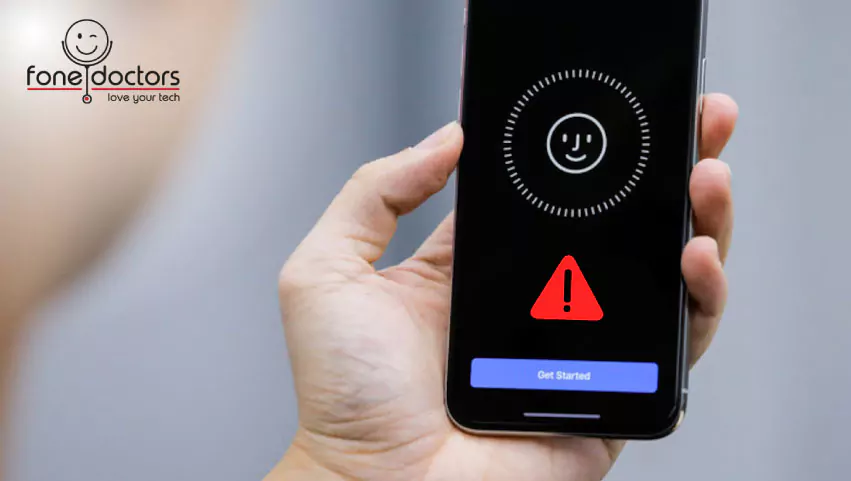
You paid for a screen repair. The screen looks fine. And now, every time you pick up the phone, it asks for your passcode — because somewhere between handing it over and getting it back, Face ID stopped existing.
Maybe you got a "Face ID Not Available" message. Maybe Settings says "Unable to activate Face ID on this iPhone." Maybe it just silently gave up. Either way, Face ID not working after a screen replacement is one of the most common complaints in the entire repair industry, and it is almost never bad luck. It is the direct, predictable result of a specific step being skipped.
The good news is that in a large share of cases it is fixable. The frustrating news is that the fix often costs more than the original repair would have if it had been done properly.
At Fone Doctors we see several of these a week, usually from customers who had a cheap repair elsewhere and did not know what to ask for. This guide explains exactly what happened inside your phone, what can be done about it, and how to make sure it never happens again.
What Face ID Actually Is
Face ID is not the front camera. It is a separate system called the TrueDepth array, and understanding its parts explains every failure.
| Component | What it does | Where it lives | Can it be replaced? |
|---|---|---|---|
| Flood illuminator | Bathes your face in invisible infrared light so the system works in the dark | On a flex cable attached to the display, alongside the earpiece speaker and proximity sensor | No — it is cryptographically paired to your logic board |
| Dot projector | Projects 30,000 infrared dots to map your face in 3D | In the front camera module, on the frame | No — also paired |
| Infrared camera | Reads the dot pattern | In the front camera module, on the frame | No — also paired |
| Proximity sensor | Detects your face is close; turns the screen off during calls | Same flex as the flood illuminator | Only as part of that original flex |
| Ambient light sensor | Measures room light for auto-brightness and True Tone | Same flex on many models | Only as part of that original flex |
| Front camera | Takes selfies and FaceTime video | Frame-mounted module | Yes — it is not part of the security chain |
The critical fact is in the first row. The flood illuminator is attached to the screen assembly, not the phone body. When a screen is replaced, that flex must be carefully detached from the old screen and transferred to the new one. It is delicate, it takes time, and it is the single most common step skipped by budget repairers.
Why Apple designed it this way
Face ID unlocks your bank apps. If any component in the chain could be swapped for a generic part, an attacker could substitute one and potentially bypass the security. So Apple pairs each TrueDepth component to the specific Secure Enclave in your phone's processor at the factory. Introduce a component from any other phone, and the Secure Enclave refuses to trust the system. Face ID disables itself entirely.
This is deliberate security, and it is not something any repairer can override.
The Five Ways a Screen Repair Kills Face ID
| Cause | What happened | How common | Fixable? |
|---|---|---|---|
| 1. Flex not transferred | The repairer fitted a complete third-party assembly that came with its own flood illuminator flex, and discarded or lost your original | Very common with cheap repairs | Only if your original flex can be recovered from the shop |
| 2. Flex torn during transfer | The original flex was moved but damaged in the process — a crease, a tear, a lifted component | Common | Often, via microscope flex repair |
| 3. Flex connector damaged | The tiny board connector was crushed or the pins bent during reassembly | Occasional | Often, via board-level connector rework |
| 4. Dot projector damaged | The frame-mounted front camera module was disturbed or the projector flex torn | Less common | Sometimes, via specialist repair |
| 5. Earpiece speaker flex not seated | Flex transferred but not fully clicked into its connector | Common, and the easiest | Yes — reseating fixes it |
Notice how many of these are fixable. Most people are told "Face ID is gone, nothing can be done." That is true only in the first case, and only if the shop cannot find your original flex.
What the Error Messages Mean
The exact wording tells you something about what failed.
"Face ID Not Available. Try setting up Face ID later." The phone can see the TrueDepth hardware but at least one component is not responding. Frequently the flood illuminator flex — cause 1, 2 or 5 above.
"Unable to activate Face ID on this iPhone." The Secure Enclave has detected an untrusted or missing component and has locked Face ID out. Most often a non-original flex was fitted, or the original was damaged badly enough that its identity cannot be read.
"Move iPhone a little lower / higher" that never resolves. The system is running but the dot projector or infrared camera is not returning usable data. Cause 4, or dirt and adhesive on the sensors.
Face ID works but the screen does not turn off during calls. Face ID survived but the proximity sensor on the same flex is not working — a partial flex fault, usually fixable.
Face ID works but auto-brightness and True Tone are gone. Ambient light sensor on the flex is dead or unpaired. Often accompanies a poorly done transfer.
Can It Be Fixed?
This is the question that matters, and the honest answer is: it depends on which of the five causes applies, and a diagnostic is the only way to know.
What a specialist can do
- Inspect the flex under a microscope. A torn trace, a lifted component or a creased ribbon is often visible and often repairable — the flex is rebuilt or the damaged section bridged.
- Reseat or rework the connector. Bent pins and crushed connectors can frequently be corrected or the connector replaced at board level.
- Recover the original flex. If a shop fitted a full assembly, your original flex may still be attached to your old screen. Some shops keep old parts briefly. It is worth asking, quickly.
- Transplant the flood illuminator chip. In the most advanced cases, the paired illuminator component itself can be moved from a damaged flex to a donor flex under microscope. This is genuine micro-soldering and not every repairer can do it.
What nobody can do
Fit a brand-new flood illuminator from any source and have Face ID work. Only Apple, with access to Apple's calibration systems, can pair a new TrueDepth component to your phone. If your original is unrecoverable, the options are an Apple repair — often a full display and TrueDepth service at Apple's pricing — or living with passcode unlock.
If your Face ID stopped working after a repair elsewhere, bring the phone to our London clinics as soon as possible for a free diagnostic. We will tell you which case you are in and exactly what is possible. Speed matters, because the shop that did the original work may still have your old parts.
How We Keep Face ID Working During a Screen Repair
Preventing the problem is a matter of process, not luck. Here is what a correct repair involves.
- Face ID tested and confirmed working before the repair begins. Documented, so both sides know the starting position.
- Display separated under controlled heat at a temperature that softens the adhesive without stressing the flex cables routed near the top edge.
- The earpiece, flood illuminator and proximity sensor flex is released from the old display with a plastic tool — never metal, never force — working from the bracket outward.
- The flex is inspected under magnification before transfer. If it is already damaged from the original impact, you are told before anything is fitted.
- The flex is bonded to the new display in precisely its original position. Misalignment by a fraction of a millimetre puts the illuminator's window out of position and degrades Face ID in low light.
- The flex connector is seated with the phone powered off and confirmed clicked in before the display is closed.
- Face ID is tested — setup and unlock, in normal and low light — before the phone is returned. So is the proximity sensor, so is auto-brightness.
Our iPhone repair service does this on every Face ID iPhone, from the X to the 17 Pro Max. It adds ten to fifteen minutes to a screen repair. It is why our screen repairs do not come back with Face ID complaints.
Questions To Ask Before Any iPhone Screen Repair
| Ask this | The answer you want |
|---|---|
| Will you transfer my original Face ID flex to the new screen? | Yes, always |
| Do you test Face ID before and after? | Yes, and we document it |
| What if the flex is already damaged from the drop? | We will tell you before we fit anything, and explain the options |
| Do you fit complete third-party assemblies with their own sensors? | No — the sensors must be yours |
| Will True Tone and auto-brightness work afterwards? | Yes — the ambient light sensor is on the same flex and we calibrate True Tone |
| What warranty covers Face ID after the repair? | Twelve months, same as the screen |
A shop that hesitates on the first question has told you everything you need to know.
Related repair guides
See also cracked phone screen repair in London and OEM vs aftermarket phone screens.
Key Takeaways
- Face ID components are paired to your phone at the factory. Generic replacements will never work, by design.
- The flood illuminator flex lives on the screen and must be transferred during every screen repair. Skipping this is the number one cause of Face ID failure after repair.
- Many Face ID failures after a bad repair are fixable — torn flexes, crushed connectors and unseated cables can all be addressed by a specialist.
- If your original flex was discarded, only Apple can restore Face ID. Ask the original shop for your old parts immediately.
- True Tone and the proximity sensor share the same flex. If they failed too, the diagnosis is the same.
- Ask "will you transfer my original Face ID flex?" before any screen repair. It is the only question that matters.
Face ID Stopped Working? Bring It In
Free diagnostic under magnification, honest assessment of what is recoverable, microscope flex and connector repair, and no fix no fee. Walk into our London Bridge, Liverpool Street or Canary Wharf clinics, or book a collection.
Book a diagnostic: https://fonedoctors.co.uk/booking/device
See all repair prices: https://fonedoctors.co.uk/prices
Call the clinic: +44 20 7403 9111
Frequently asked questions
Because the flood illuminator flex — which is attached to the screen and cryptographically paired to your phone — was either not transferred to the new screen, was damaged during transfer, or its connector was not seated properly. It is a process failure at the repair, not a random fault. In many cases it is fixable by a specialist.
Share with your community
Get in touch
Questions about this repair? Send a message or book a slot at a London clinic.